We’re Here to Help
Paying with Bitcoin might sound complicated, but we’ve got your back.
You don’t need to manually purchase any Bitcoin to check out at Kreleaf. If you use one of our recommended wallet apps on your mobile device, they will automatically handle any crypto conversions in the background, giving you a fast, seamless, and cash-like experience from start to finish.
First, let’s choose your app.
Which App to Use?


Steps to Easy Crypto Purchases
Note: We recommend connecting a debit card for immediate payment. Credit card vendors typically treat crypto purchases as cash advances which may incur additional fees. Bank Accounts allow larger, fee-free deposits into cash accounts, but can take multiple business days to settle before available for use.
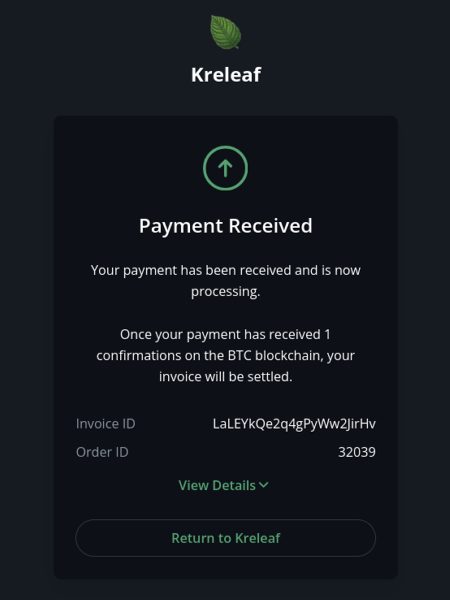
After paying, the invoice will show “Payment Received”
You will receive an order confirmation email
Changing App for “Pay in wallet”: Apple mobile users who want to switch their default app handling the “Pay in wallet” link, temporarily uninstalling the current default app will allow you to set a new default app when selecting the “Pay in wallet” link. Android users can remove or add permissions of default apps. If you are not on a mobile device, simply scan the QR code with your mobile camera to Open with Strike on mobile.
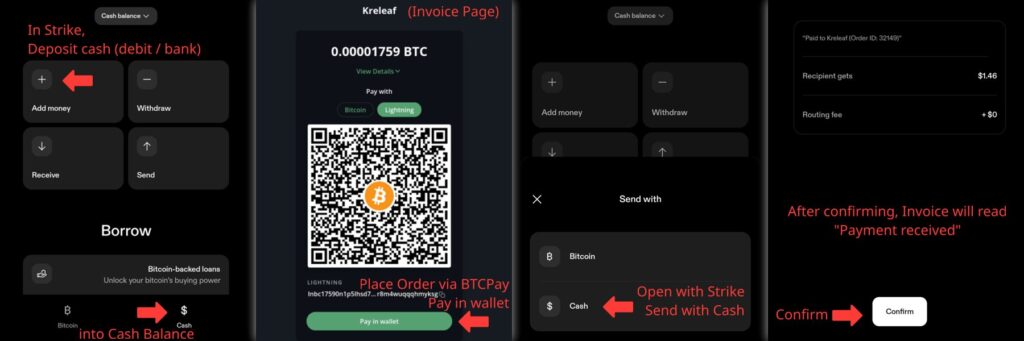
Strike – Payment Flow Visual Guide
After verifying your ID, you can attach a debit card for instant payment up to $1000 weekly for new users. Attach a bank account for slower, larger transfers up to $3000 weekly (3-5 days to clear).
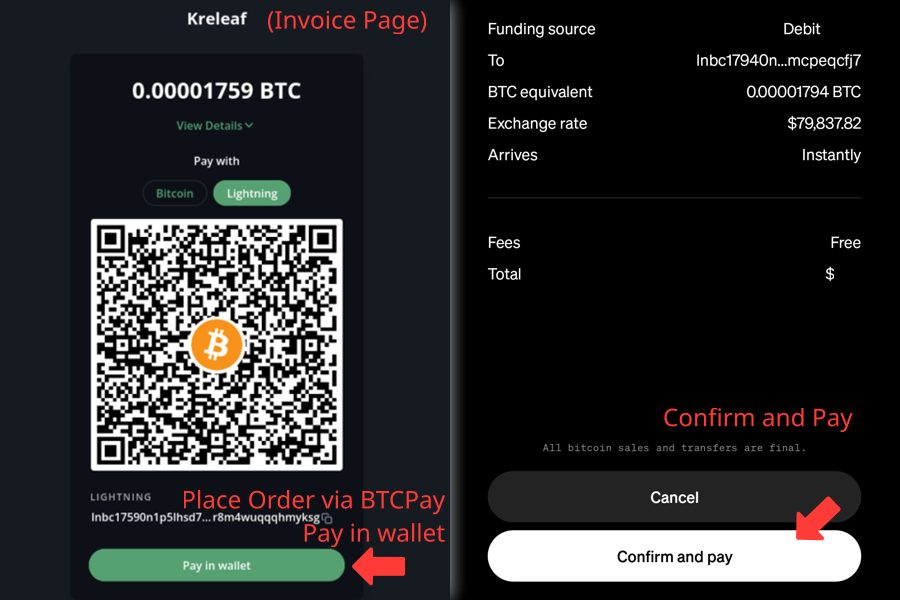
Cash App – Payment Flow Visual Guide
If you already have Cash App, you can pay up to $1000 weekly in Lightning payments with an attached debit card. Simply Open with Cash App when selecting “Pay in wallet” and click “Confirm and Pay”
If you see a “Pay” button and large letters “BTC” on the screen, STOP! This means you are trying to pay our bitcoin payment address. We do not recommend paying for Bitcoin with Cash App unless you already own BTC or know how to manage your BTC balance. If your payment does not default to opening with Lightning, please use Strike for easy and near-instant Bitcoin payments.
Why Do I Have to Verify Identity?
Cryptocurrency has grown from a niche technology into a widely recognized, legitimate way to do business. Because of this mainstream adoption, processing crypto payments now requires the same standard security and compliance measures as your local bank.
To legally accept digital assets, we must comply with global Anti-Money Laundering (AML) regulations. A brief KYC (Know Your Customer) check ensures that bad actors cannot use these platforms for fraud or illicit activities. By verifying your identity, you are helping us keep the crypto ecosystem safe, secure, and legitimate for everyone.
Bitcoin vs Lightning: What’s the Difference?
Bitcoin and Lightning are similar, but not the same. Without getting too technical, think of Bitcoin as the “core payment network” and Lightning as the “newer, faster payment network.” To put it simply:


We want your checkout experience to be as fast and seamless as possible. Most of our customers prefer to link a debit card and pay their invoice instantly for a small fee under 2%.
For fee-free funding of your bitcoin purchases, you can add cash to your cash balance of Strike by linking a bank account and waiting a few days for the funds to clear. For orders under $1,000, we recommend using Lightning, which is the default method.